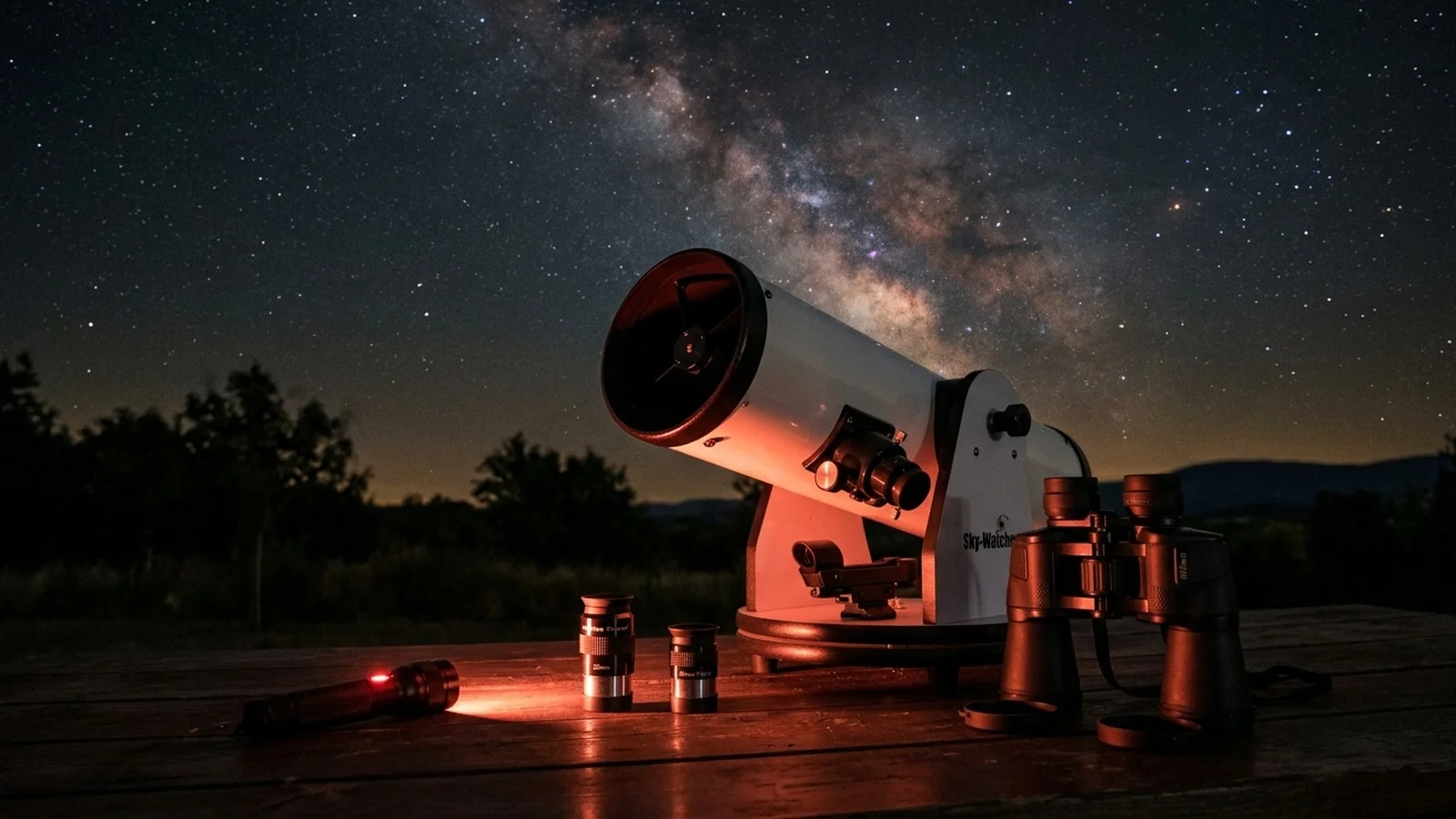
Celestron NexYZ Smartphone Adapter
| Key Specifications | |
|---|---|
| Mount Type | Universal smartphone holder |
| Barrel Compatibility | 1.25" and 2" (with included adapter) |
| Alignment Axes | 3-axis (x/y/z) for perfect centering |
| Wireless Control | Bluetooth shutter release |
| Phone Support | Any smartphone 4.5"–6.5" |
| Weight | ~400g |
| Battery | CR2032 (included) |
| Warranty | 2 years (Celestron standard) |
Who Is This For?
The Celestron NexYZ is for anyone who owns a telescope and a smartphone and wants to photograph the Moon and planets without buying expensive dedicated hardware.
- Absolute beginners testing astronomy imaging for the first time: no USB cables, no software learning curve, no processing required
- Casual lunar photographers who want Moon craters in their phone gallery to share with friends
- Holiday astrophotographers taking a scope abroad (the adapter is compact) and wanting to image Jupiter or Saturn from a dark sky site
- People deciding if they'll commit to astrophotography before spending £150+ on a dedicated camera
Skip this if you're serious about planetary imaging already: jump straight to a USB camera like the ASI120MC-S (around £150) for better results. But as a first step, nothing beats it.
What Can You Capture?
The Moon
Craters, mountains, terminator detail. Modern phones have excellent low-light sensors: lunar photos rival what professional observatories publish.
Jupiter
Cloud belts, the Great Red Spot, Galilean moons. The challenge is atmospheric turbulence: capture a few hundred photos and pick the sharpest.
Saturn
Rings unmistakable. On dark, steady nights you'll glimpse the Cassini Division (the gap). Phone sensors struggle with faint planet light.
Bright Stars & Clusters
Detailed close-ups of Albireo's colour contrast, the Pleiades star pattern, or open clusters, but only with excellent alignment.
Note: Image quality depends heavily on your phone's camera, atmospheric seeing, and how well you centre the phone on the eyepiece exit pupil. A poorly aligned phone will show vignetting (dark edges) and reduce image quality dramatically.
The Workflow
Setup: Mount your phone in the holder, insert into your eyepiece focuser (1.25" or 2"), adjust the three screws until the Moon fills the phone screen with no dark edge vignetting. This is the critical step: bad alignment produces blurry, vignetted images.
Capture: Tap the Bluetooth shutter release (no touching the scope, which causes vibration). The phone's native camera app captures at full resolution. Shoot bursts: take 20–30 photos; one or two will be sharp.
Processing: None needed. Save to your phone gallery and share. If you want to get fancy, basic phone editing (brightness, contrast) is enough. No computer required.
What the Community Says
Perfect entry point. Stargazers Lounge threads consistently recommend the NexYZ for people asking "How do I photograph the Moon?" It's the simplest answer that actually works.
Alignment is critical. Owners emphasise that if you don't centre the phone perfectly, image quality suffers immediately. The 3-axis design makes this easier than competitors, but it still requires patience.
Results depend on your phone. Modern iPhones and Pixels produce excellent lunar images. Older budget phones struggle with low-light performance and produce noisy images.
Bluetooth shutter is game-changing. Unlike competitors requiring USB or physical button presses, wireless triggering eliminates vibration: images are noticeably sharper.
Jupiter & Saturn are challenging. Planets are smaller and dimmer than the Moon. Rapid atmospheric turbulence means most photos are blurry. You need patience and many attempts.
Known Limitations & Tradeoffs
- Phone sensor limitations. Even premium phones struggle with faint planetary light. Jupiter and Saturn require excellent atmospheric conditions and many attempts. The Moon is much easier.
- Alignment difficulty. The 3-axis design is user-friendly, but finding perfect alignment takes 5–10 minutes. Misaligned images are noticeably worse: it's worth getting it right.
- No zoom control. Your phone's native camera app controls exposure and focus: no manual astro-optimised settings. This limits advanced imaging.
- Thermal issues in summer. Smartphones throttle performance in heat. Summer observations with direct sunshine can cause autofocus hunting and colour shift.
- Limited by your eyepiece quality. A cheap eyepiece produces a cheap image. If your scope has bundled eyepieces, upgrade to a good one (BST StarGuider 8mm, ~£45) for much better results.
- Phone compatibility edge cases. Very large phones (6.5"+) or cases with thick bezels may not fit the holder. Test before relying on it.
Pairs Well With
Good Eyepiece
A quality 8mm eyepiece (BST StarGuider, Explore Scientific 68°) produces a better image to photograph. Your adapter is only as good as your eyepiece.
~£45–£100 View at FLO →Telescope with Steady Mount
Shaky mounts = shaky photos. A solid tripod or Dobsonian means better planetary images: image quality correlates directly with mount stability.
Included with scopeSmartphone with Good Night Mode
Modern iPhones (12+) and Pixels (5+) excel at low-light astrophotography. Older or budget phones produce noisy, dim images.
£400+Dark Sky Site
Observing from light pollution-free skies makes Jupiter and Saturn noticeably brighter and easier to image. Light pollution dims planets dramatically.
TravelThe Upgrade Path
If your main interest is Moon photography: Stay here. The NexYZ produces excellent lunar images and there's little reason to upgrade. Professional moon photographers use dedicated lunar cameras or large telescopes, not incremental hardware.
If you want sharper planetary images: Graduate to the Svbony SV105 (around £40) or ZWO ASI120MC-S (around £150). These replace your eyepiece with a camera that records video, which you then stack for sharper results. The workflow is longer, but results are noticeably better.
If you get interested in deep-sky or wide-field imaging: Move to the Canon EOS 2000D (around £450) for Milky Way and nebula photography. This opens an entirely different hobby.